
To download an app icon, open it from My icons or the finished result in the studio and use Download & export. Download icon gives you the original PNG. App icon pack gives you a ZIP with every size iOS, Android and the web need. SVG and PSD layers are included with Pro and Max plans and with credit packs.
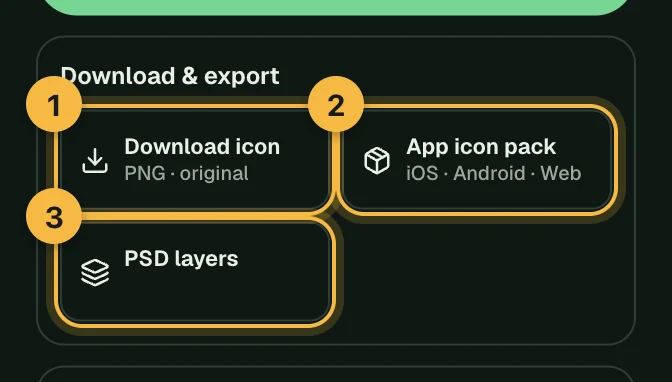
Which format should I download?
| Format | Use it for |
|---|---|
| PNG (original) | Design files, mockups, slides, or anywhere you need one large image |
| App icon pack | Shipping an app: Xcode, Android Studio, a website or a web app |
| SVG | Websites, Figma and further vector editing (Pro, Max or a credit pack; not every style) |
| PSD layers | Editing individual parts in Photoshop (Pro, Max or a credit pack) |
PNG: the original icon
The PNG is a full, opaque square with no rounded corners, at least 1024 × 1024 pixels. App stores and phones add the rounded shape themselves, so this is exactly what they expect. The one exception is Fused glass, whose PNG comes with the phone icon outline already applied.
Need a transparent background, for example for a logo? Run the PNG through the background remover.
App icon pack: every size in one ZIP
The pack is built from your icon in seconds and includes a README.txt explaining each folder.
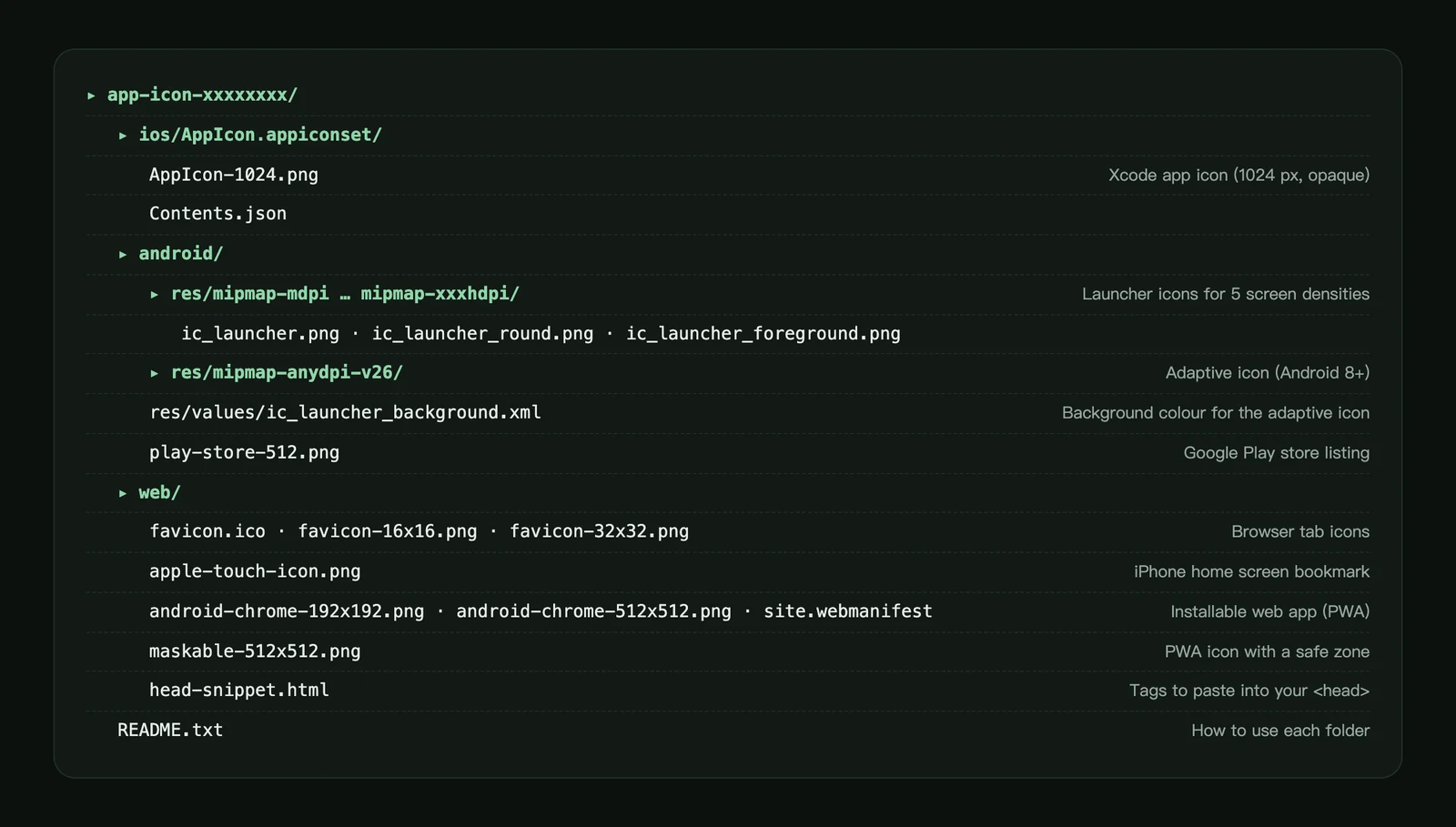
- iOS: open your project in Xcode, delete the existing
AppIconin your asset catalog, and drag inios/AppIcon.appiconset. It contains a single 1024 px icon, and Xcode creates the smaller sizes. - Android: copy the contents of
android/resinto your app'sapp/src/main/resfolder. It includes launcher icons for five screen densities, round icons and an adaptive icon for Android 8 and later. Icons in flat styles also get a monochrome layer for Android 13's themed icons; the README in the pack says whether yours has one. Uploadandroid/play-store-512.pngas your Google Play store icon. - Web: copy the files in
web/to your site's root and pastehead-snippet.htmlinto your page's<head>. Add your app's name tosite.webmanifestif you want it installable as a web app.
Before you submit to a store, check the App Store and Google Play icon requirements. For the full size list, see our app icon size guide.
SVG: vector outlines
SVG converts the icon into vector shapes you can scale and edit in Figma or on a website. It's included with Pro and Max plans and with credit packs; on other plans the button shows how to get it.
- Not every style converts cleanly, so SVG only appears for icons that do. Glass and metal styles don't offer it.
- Similar colours may be merged into one, and fine lighting effects are simplified.
- Use the PNG or the icon pack for app store submissions.
The first conversion of an icon uses credits, shown on the button. Downloading the same icon's SVG again doesn't charge again.
PSD layers
PSD layers split the icon into separate layers you can move and recolour in Photoshop. Like SVG, it's included with Pro and Max plans and with credit packs.
- The layers are redrawn by AI, so colours can differ slightly from the original, and the AI decides how the icon is split into parts.
- A hidden Original (reference) layer is included so you can compare.
- Splitting takes about a minute; you can keep working meanwhile. If it fails, your credits are returned automatically.
- Once an icon has been split, downloading its PSD again is free.
Frequently asked questions
Does downloading a PNG or the icon pack cost credits?
No. The PNG and the app icon pack are free to download as many times as you like. Only SVG and PSD layers use credits, and the cost is shown on the button.
Why don't I see SVG or PSD for my icon?
SVG and PSD come with Pro and Max plans and with credit packs, and SVG isn't offered for every style (glass and metal don't convert cleanly). If you already exported an icon's SVG or PSD, downloading it again stays free on any plan. The PNG and the app icon pack are always available; see the plans.
Should I round the corners before uploading to the App Store?
No. Upload the square icon. Apple and Google apply the rounded shape automatically. See app icon requirements.
Did not find an answer?
Open a ticket and tell us what happened. We will reply as soon as we can.